There is a specific pattern that merchants with growing Shopify stores run into with WhatsApp automation. They install an app, set up cart recovery and order notifications, things work fine for a few weeks or months, and then messages stop going out. Sometimes the WhatsApp number itself gets restricted or permanently banned by Meta. The merchant loses not just the automation but their entire business WhatsApp number.
The most common cause is the same: the app uses an unofficial connection method called link-a-device instead of the official WhatsApp Business API, which carries a significantly higher risk of restrictions or account bans as automation volume increases.
Understanding this distinction is the most important thing you can do before choosing a WhatsApp automation app for Shopify.
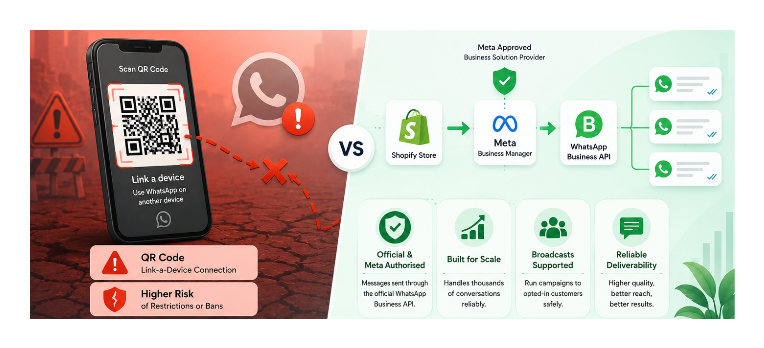
Link-a-Device vs the WhatsApp Business API
Link-a-device apps ask you to scan a QR code that connects your WhatsApp account to their servers. This is the same mechanism used by WhatsApp Web — designed for a human using a second device, not for servers sending thousands of automated messages.
The reason QR code apps get detected is straightforward. WhatsApp Web works by mirroring your phone's connection to another device. When automation software uses this same channel to send hundreds or thousands of messages in patterns no human could replicate, Meta's systems identify the behaviour as automated and flag the account. At low volumes the pattern may go undetected. As message volume grows with more orders, more cart recoveries, and more broadcasts, the detection probability increases significantly. Restrictions typically start with temporary message blocks. At higher volumes or if the pattern is consistent, the account gets permanently banned.
Meta does not authorise using WhatsApp Web or link-a-device as an automation platform. The WhatsApp terms of service explicitly prohibit automated or bulk messaging through unofficial channels. App Store reviews for link-a-device apps document accounts being permanently restricted after using the app only for order notifications, with no spam and no broadcasts, simply because the automation pattern was detectable.
The WhatsApp Business Platform is Meta's official channel for business automation. Companies access it through Meta-approved Business Solution Providers. Messages sent through the API are authorised by Meta, and automation is explicitly sanctioned. Using the official API does not eliminate all risk of enforcement. Businesses can still face quality rating drops or template rejections for policy violations. But businesses following Meta's policies are far less likely to face restrictions simply because they automate messaging.
API vs Link-a-Device at a Glance
| Link-a-Device | WhatsApp Business API | |
|---|---|---|
| Meta authorised | No | Yes |
| Setup method | QR code scan | Facebook Business Manager |
| Risk of bans | High at volume | Very low |
| High volume support | Poor | Excellent |
| Broadcast campaigns | Risky | Supported |
| Pricing model | Flat monthly fee | Platform fee plus Meta conversation charges |
The quickest way to identify which connection method an app uses: look at the setup instructions. If the app asks you to scan a QR code or link a device, it is using the unofficial channel. If it asks you to connect a Facebook Business Manager account or a WhatsApp Business API account, it is using the official channel.
Why API-Based Apps Handle High Volume
For most Shopify merchants, the WhatsApp Business API comfortably supports growth from hundreds to hundreds of thousands of conversations, subject to Meta's messaging tiers and quality ratings. Meta charges per conversation (a 24-hour window of messages between your business and a customer), not per message. The API supports template-based messaging at scale and broadcast campaigns to opted-in customers.
Apps built on the API inherit this scalability. When a hundred orders come through in an hour during a sale, the platform is designed to reliably deliver order confirmations at that volume. When you run a broadcast campaign to ten thousand subscribers, the messages go out through an authorised channel rather than one flagged as automated abuse.
Apps using link-a-device do not have this headroom. They are simulating a human using WhatsApp Web, and Meta's systems are designed to detect exactly that pattern when it repeats at volume.
What to Look For When Evaluating an App
Official WhatsApp Business API connection. The app listing or setup documentation should state this explicitly. If setup involves a QR code scan, it is not the API.
Meta BSP status. The app developer should be either a Meta Business Solution Provider themselves or built on top of one. This means Meta has verified and approved them to offer API access.
Message template handling. API-based messaging requires pre-approved message templates for outbound messages that initiate a conversation. The app should handle template submission and approval through Meta as part of the setup. If the app lets you send completely free-form automation messages with no template requirement, it is likely not using the API.
Transparent pricing structure. API apps have a platform fee plus Meta's per-conversation charges. Apps that charge only a flat monthly fee with unlimited messages often rely on unofficial connection methods or bundle API costs in ways worth investigating before committing.
Shopify Flow integration. For stores with existing automation, Flow integration lets WhatsApp fit into your existing workflows rather than running in isolation.
Clear conversation cost explanation. The API distinguishes between conversations customers start and conversations your business initiates, with different pricing for each. A transparent app explains this clearly upfront.
Dondy for Shopify WhatsApp Automation
Dondy is built on the official WhatsApp Business API. Setup goes through Facebook Business Manager rather than a QR code scan, which confirms it is using the proper API channel.
Key features for high-volume stores:
- Abandoned cart recovery via automated WhatsApp sequences
- Order confirmation and fulfilment notifications triggered by Shopify order status changes
- Shopify Flow integration for custom triggers from any Flow-compatible event
- Broadcast campaigns to opted-in customer segments
- AI chatbot for handling common support queries
- COD order verification
It integrates with Judge.me, Loox, and Klaviyo, so WhatsApp fits into an existing marketing stack rather than replacing it.
The pricing structure reflects the API model: a platform subscription plus Meta's conversation fees. The Pro plan starts at around $6.99 per month before Meta charges. Higher tiers (Power Automation at $79.99/month, Elite at $159.99/month) add features like AI chatbot, multi-agent inbox, and unlimited Flow automations.
Meta charges per conversation window rather than per message. A 24-hour window costs a fixed amount regardless of how many messages are exchanged within it. For high-volume stores, understanding this cost structure helps you forecast WhatsApp operating costs accurately before scaling up automation.
The Cost Reality of API-Based WhatsApp
Link-a-device apps are attractive partly because they are cheap, with some charging $10 to $20 per month with no per-message fees. API-based apps cost more because they pass through Meta's conversation charges on top of their own platform fee.
For a store sending mostly reactive messages (order confirmations and shipping updates), conversation costs are generally lower. Meta's pricing varies by message type and region and continues to evolve, so check the latest pricing at the WhatsApp Business Platform pricing page when estimating operating costs.
For stores running broadcast campaigns or proactive cart recovery, the per-conversation cost adds up. The calculation that matters: if a cart recovery campaign recovers one order per hundred messages sent and your average order value is $80, the revenue per recovered cart far exceeds the cost of API conversations. The ROI case for proper WhatsApp automation is strong when it actually delivers messages reliably, and it only does so consistently on the official API.
Setting Up the WhatsApp Business API for the First Time
Apps built on the API require a Facebook Business Manager account and a WhatsApp Business API account linked to it. For most merchants this is a one-time setup that takes 30 to 60 minutes.
You need: a Facebook Business account, a phone number not already registered as a WhatsApp account (or be willing to delete the existing WhatsApp account from that number), and business verification through Meta.
The app typically walks you through this as part of onboarding. Dondy and similar API-based apps have guided setup flows that handle the Meta connection steps without requiring technical knowledge.
Once connected, your WhatsApp number is registered as a WhatsApp Business API number. Eligible businesses may be able to obtain a verified business profile through Meta separately, though this is not required to use automation.
Which Type of Store Needs What
Stores under 100 orders per month: A simple WhatsApp chat widget that opens a conversation when customers click it may be enough. No API setup, no Meta review, fully manual but functional for low volume.
Growing stores processing daily orders: An API-based app is the right infrastructure. Cart recovery, order notifications, and occasional broadcasts all work reliably at this scale without account risk. The setup investment pays back quickly through recovered carts and reduced support load.
High-volume stores running regular broadcast campaigns: Only API-based apps are viable. Link-a-device apps will eventually get accounts banned at this scale, and migrating after a ban means losing the number entirely.
When a Simple WhatsApp Chat Widget Is Enough
If you just want a chat button that opens a WhatsApp conversation with you when customers click it, that requires no API and no Meta review process. A basic WhatsApp chat widget is a link formatted as https://wa.me/yournumber embedded behind a button. Several free apps add this in one click. Customers initiate conversations, you reply yourself, and there is no automation at all.
If your current support volume is low and you just want an accessible chat channel, a simple widget is the right starting point. When you need automated order notifications, cart recovery, or marketing broadcasts at scale, that is when API infrastructure becomes necessary.
The Bottom Line
Choosing a WhatsApp automation app is not really about features. It is about choosing the infrastructure behind those features. Apps built on unofficial QR code connections may seem simpler and cheaper, but they carry significant account risk as your store grows. If WhatsApp will be a core sales or support channel for your business, starting with the official WhatsApp Business API avoids costly migrations and eliminates the risk of losing your business number to a Meta ban.
For broader context on how WhatsApp fits alongside other customer communication tools on Shopify, the article on adding a simple live chat to your Shopify store covers the non-WhatsApp options including Shopify Inbox, which handles in-store messaging without requiring any Meta setup.