When you take orders through Instagram, it is easy to stop accepting orders from someone who has refused deliveries or caused repeated problems. You can block the account and move on.
The same person can still visit your Shopify store and place a new order using a different email address, phone number, or network. Shopify does not have one button that blocks a customer everywhere, so the right setup depends on whether you want to flag the order, cancel it, or stop the checkout before the order is created.
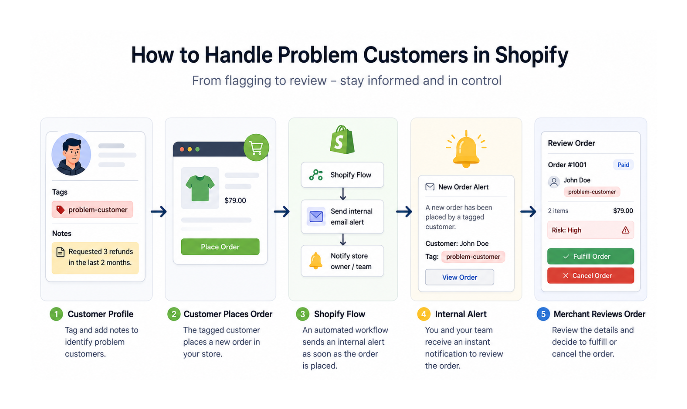
Start With A Customer Tag
Open the customer's profile in Shopify and add a tag such as blocked-customer or refused-delivery. Add a note explaining what happened so you know why the customer was flagged when they appear again.
The tag does not block the customer by itself. It gives you something that Shopify Flow can check when the customer places another order.
Get Notified When They Order Again
If you want to review the order yourself, use Shopify Flow to send an alert when a tagged customer orders.
Create a workflow with these settings:
Trigger: Order created
Condition: Customer tags contains blocked-customer
Action: Send an internal email
The message can include the customer's name, email address, and order number. You can then cancel the order before it is fulfilled, or decide that the order is safe to send.
This is the better choice when a shared address could belong to more than one person. It gives you a warning without automatically cancelling every order that matches the tag.
Cancel Matching Orders Automatically
If you already know that a tagged customer should not receive another order, Shopify Flow can cancel the order automatically.
Use Order created as the trigger. Add a condition for the customer tag, then add Cancel order as the action. You can choose whether Shopify refunds the payment, restocks the items, sends a cancellation email, and adds a staff note.
The order is created before Flow cancels it. This means it will appear in your admin, but it should not reach fulfillment if the workflow runs correctly.
Shopify Flow also has templates for cancelling orders from deny-listed email addresses and customers who have returned products repeatedly. These are useful when your rule is based on an email address or a return history instead of a customer tag.
Block Checkout With Fraud Control
If you want to stop the order before it is created, use Shopify's free Fraud Control app. Its checkout rules can block a checkout using an email address, billing detail, or IP address.
These rules require Shopify Payments. Go to Apps → Fraud Control → Rules → Create rule, then add the detail you want Shopify to check.
I would use the email address or billing details as the main rule. An IP address can change when someone uses mobile data, a VPN, or a different network, so an IP block on its own can stop the wrong customer.
Use a narrow rule when possible. Blocking an address shared by several people can prevent a legitimate customer from checking out, and Fraud Control does not know why you added the rule.
If You Do Not Use Shopify Payments
Fraud Control's checkout rules are not available without Shopify Payments. In that case, Shopify Flow can still flag or cancel the order after it is created, but it cannot stop the checkout itself.
If you need to prevent the order from being created, you need a third-party checkout-blocking app. Check whether the app blocks checkout or cancels the order afterward, because those work differently.
What I Would Use
I would start by tagging customers who have repeatedly refused deliveries or caused losses. If another person could share their address, I would use a Flow alert and review the order before fulfilling it.
If the same customer should not be allowed to place another order, I would use a Flow cancellation workflow. If the store uses Shopify Payments and needs to stop the checkout itself, I would use a narrow Fraud Control rule based on the customer's email or billing details.
IP blocking alone is not enough for this problem. It is better used with another detail, not as the only reason to block a checkout.