You have edited product titles, written descriptions, added internal links, and built a few backlinks. You check Shopify Analytics or Google Search Console, but traffic stays low.
Start with Google Search Console. Check which pages Google shows and which searches trigger them. That usually points to the problem: Google has not indexed the page, the page does not match the search, or the page appears in results but receives no clicks.
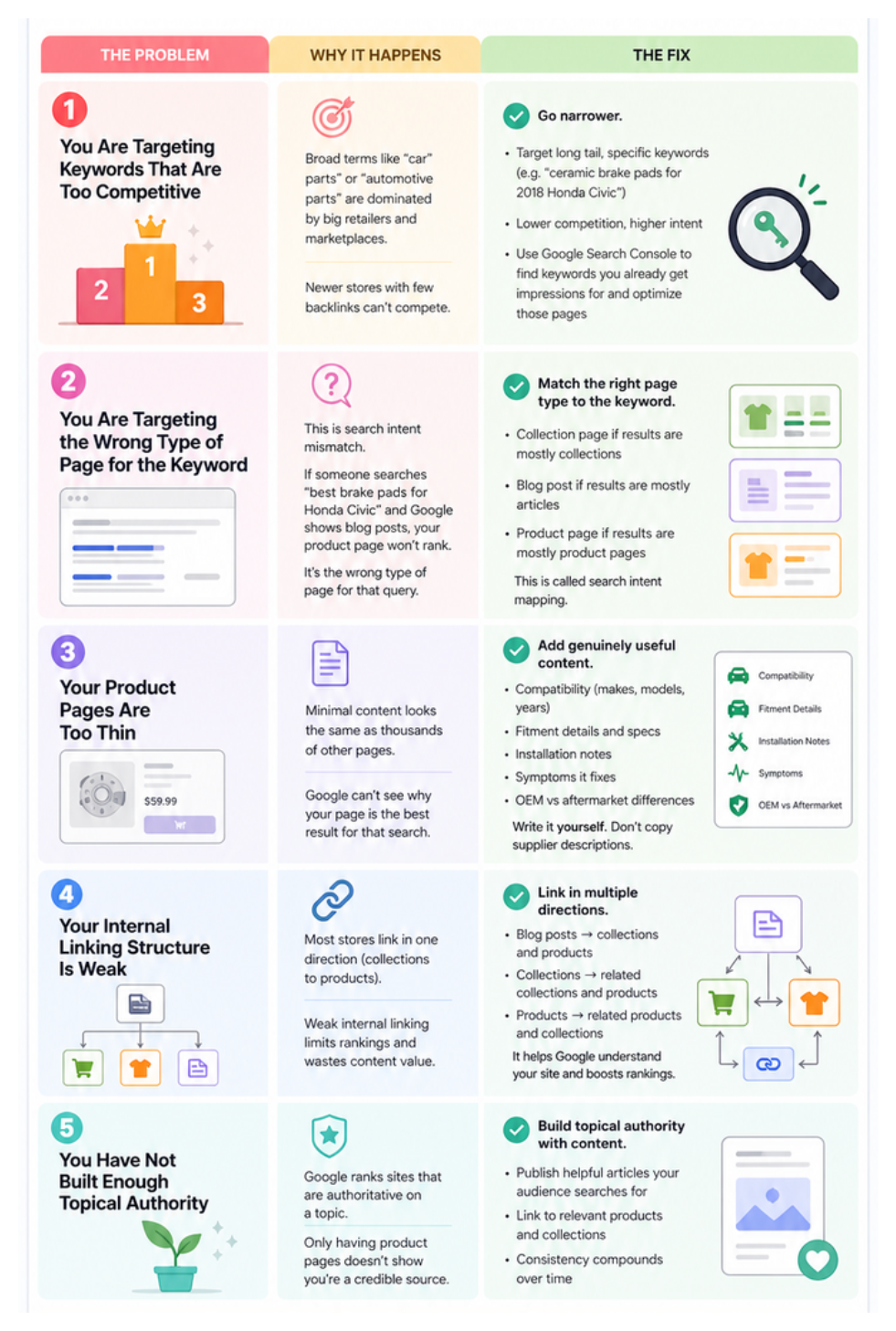
Check whether Google has indexed the page
Open Google Search Console → Pages and search for the product, collection, or article URL that you want to improve.
If the URL is not indexed, open the reason shown in the report. Check that the page is published, available on the Online Store sales channel, and not blocked from search engines. Use URL inspection to request a new crawl after fixing the issue.
Do this check before rewriting the page. Google cannot send visitors to a page that it has not included in its search results.
Check whether the page fits the search
Search Google for the phrase you want the page to rank for. Look at the pages that appear on the first results page.
If the results are collection pages, use a collection page for that search. If they are product pages, use a product page. If they are articles, answer the question in an article.
For example, a search for “ceramic coffee mugs” usually needs a page showing several mugs. A single mug product page is a better match for a search containing that product's name.
If the page type does not match the results, changing the title or adding more keywords will not solve the main problem. Create or improve the page that matches the search instead.
For more on choosing the right Shopify page for a search, read how to use collection pages to rank for more keywords.
Use impressions to find the page closest to a result
In Search Console, open Performance → Search results and review Queries and Pages.
Find pages that receive impressions but few clicks. Google is already showing those pages, so start there. Open the page's queries and compare them with the page title, heading, and opening text.
When the page answers the search, make the title and description clearer so the result gives people a reason to click. When the searches describe a different product, category, or question, create a page for that search.
A page with no impressions needs a different check. Confirm that it is indexed, linked from another page on your store, and focused on a phrase customers actually use.
Give the page information customers need
Product pages need the details that affect a purchase, such as size, material, compatibility, fit, care, or delivery information. Collection pages need a short explanation of the products they contain and the people they are for.
Write the content in your own words. Supplier descriptions copied across many stores give the page little information that makes it different from the other results.
Link the page to related products, collections, and articles. A collection should lead customers to its products, while an article should link to the collection or products it explains.
If you need the broader priority order for a new store, start with how to get organic traffic to your Shopify store.
Check links after the page is ready
Backlinks help Google discover and evaluate a store, but they should follow the page work above. Ask relevant suppliers, organisations, partners, or publications to mention your store when the relationship gives them a reason to do so.
Avoid paying for random links or submitting the store to unrelated directories. A few relevant mentions are more useful than a long list of sites that have nothing to do with your products.
What to do next
Choose one important product page and one important collection page. Check their indexing status, search each page's main phrase, and compare the page type and content with the results.
Improve the page that already receives impressions first. If both pages are indexed and match their searches but traffic remains low, add related content and links that give Google more ways to find the store.